Read the English in your game — in Thai, right where it sits.
No alt-tabbing, no copying: hold Ctrl+Alt, sweep over the English — in a game, a PDF, a video, a menu inside an app — and read the Thai where it sits. Every word you meet is kept with the sentence it came from, so the next time you meet it you already know it.
Playground · what the card shows
Any line. Read it in Thai.
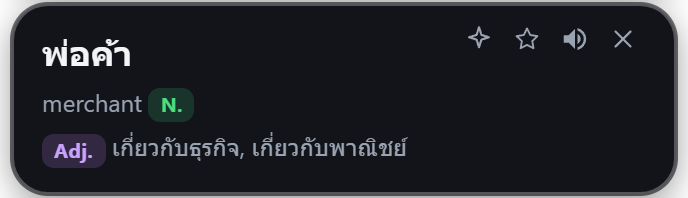
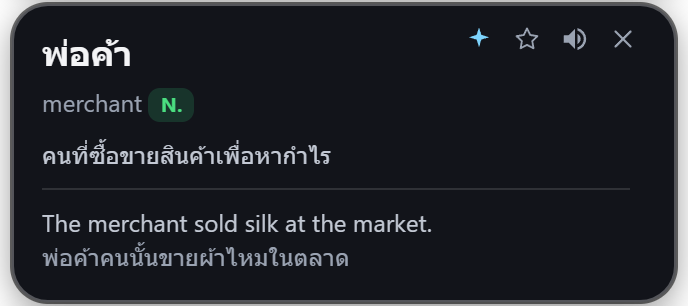
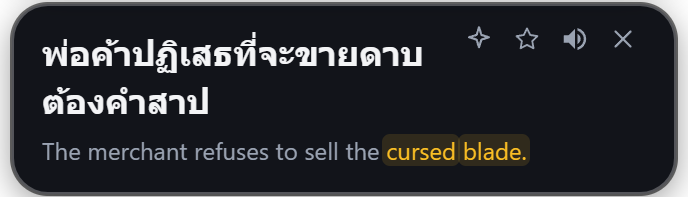
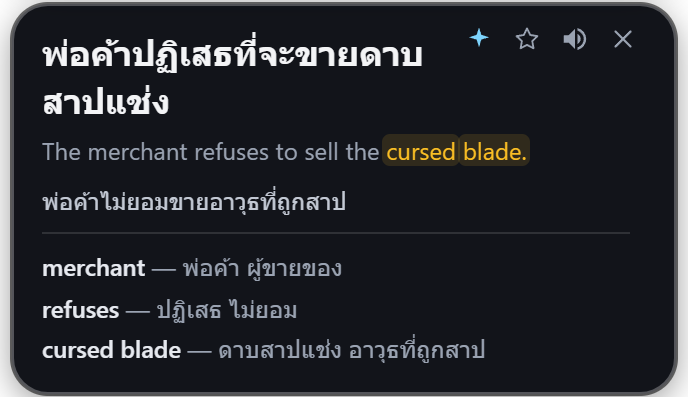
Watch the Gloss card draw itself exactly as the overlay does — Thai on top, the English source beneath — and point at any word in it, the way you would on your own screen.
Point at any word — the hover dictionary has 77,000 English words on your PC, and costs nothing per look.
10 points · you get 2,000 with the app · reading and translating never spend any
Why it exists
I built this for myself. I got tired of pausing a game, screenshotting, and pasting into Google Translate just to understand one line — by the time I was back, the moment was gone.
So it is honest about what it is: a small, personal tool that does one thing well. Sign in with Google: 7 days free, then 4 free days every month, and if it reads your game, one payment makes reading the screen yours every day.
Made by one person. If something breaks, telling me what happened is worth more to me than the sale — there is a box for it at the bottom of this page.
Learning · the other half of what you bought
Reading it is half. Six stages make it yours.
Every word you star lands in a full-size window on the same machine, with the line you met it in. Then Learn walks it up six stages — meet the word, read what it is like to use, recognise it, put it back in your own sentence, produce it from a gap, and finally write a sentence of your own and have it marked.
Gloss
Today Learn Words Calendar Insights GuideWhich word goes in the gap?
Something is behind that .
★ kept 3 days ago, from the line you snipped
- 01StudyMeet the word. The card flips: the word, then what it means and the line it came from.
- 02Card ✦What the word is like to use — what it goes with, how formal it is, and the mistake a Thai speaker reliably makes with it.
- 03TestRecognise it. Multiple choice, both directions — the word from the meaning, or the meaning from the word.
- 04UsagePut it back in the sentence you met it in. Not a sentence from a textbook — the line off your own screen.
- 05RecallA sentence with a gap, and nine of your other words competing for it. Produce it, do not pick it.
- 06Write ✦Write your own sentence with the word in a new situation, and the AI marks it: natural, nearly, or not this sense.
They run in that order every time, because it is a teaching order and not a menu. You pick how far up the ladder one sitting goes — and the further it goes, the longer the word stays away: one stage brings it back tomorrow, four stages brings it back in 20 days.
- Your words, not a word list. Only what you starred, each one with the line it came from — so a word you met in a boss fight is revised as that line, not as a flashcard someone else wrote.
- A sitting, not a quiz. Learn spaces the words out over days (SRS), and Calendar and Insights say what you actually did — per day and per month.
- It stays on your machine. The list is a file you can export to Anki whenever you like. No account, no server holding your vocabulary.
Pricing · what it costs
One payment. Yours forever.
No subscription, nothing to renew, no feature held back for a later tier. You pay once and the app is yours — including every update.
1 · The app · buy this once and you are done
The app · 2,000 AI points
- Read English anywhere on screen → Thai. Unlimited, forever, no meter.
- Point at any word: 77,000-word dictionary on your PC.
- Live subtitles, word list, SRS review, text-to-speech.
- 2,000 AI points included — pronunciation, meaning, word forms, an example.
- Every future update included — no upgrade to buy later.
The app · 6,000 AI points
- Everything in the ฿149 pack.
- 6,000 AI points from the start.
- For someone who already knows they will use points a lot.
- Points never expire. They sit on your key until you spend them.
- Same app, same updates — the only difference is the balance it starts with.
Not ready to buy? Free: 7 days, then 4 free days every month + 50 AI points to start and 20 more on every free day — no card needed.
How to buy · card or PromptPay
Pay, and the key is on the next page.
One payment, nothing to cancel later. Sign in with the Google account for the email you paid with and the licence follows you to any machine. Card or PromptPay through Stripe, and the licence appears the moment it clears — you are not waiting on me to wake up. If you would rather transfer straight to the account, that still works too and the key comes by hand within 24 hours.
What are you paying for?
First time — includes the app
More points — for a key you already have
Already own Gloss? Take a top-up. Buying the app again issues a second key, and points do not move between keys.
Card or PromptPay, through Stripe. The key appears on the next page the moment the payment clears — nothing to wait for.
Rather transfer it yourself? PromptPay, and I send the key by hand.

฿149
the app + 2,000 AI points
Type this amount in yourself — the code carries the account, not the price.
- Scan the code with any Thai banking app and transfer the amount shown beside it.
- Leave your email below, with the time you transferred so I can match it.
- The download link and your licence key arrive within 24 hours — usually much sooner.
Not sure yet? Say what you would use it for and ask anything — same box, I read every one.
2 · AI points · optional, and only if you want them
Out of points? Top up.
10 AI points = one full card from ✦ (a short AI review is ~4). Translating, pointing at words and reopening a card never use points. Press ✦ whenever you want to really understand something — a word or a whole line: how it is pronounced, what it means in the line you met it in, the other forms it takes, and a sentence using it. The dictionary on your PC gives the plain meaning; ✦ explains it in the story you are reading. Your ฿149 comes with 2,000.
They are not a monthly allowance. What you buy sits on your key until you use it, and what came with the app is never taken back.
A word or line you already pressed ✦ on comes back as the same card, as often as you like, without spending any points. A very long passage can take up to ~16 points — the app always says so.
What the ฿149 actually buys
Reading the screen every day with no limit, and your AI point balance. Without a key, signing in with Google gets you 7 days free, then 4 free days a month, 50 AI points to start and 20 more on every free day. Pointing at a word uses the dictionary on your machine and is never metered. Run out of points and translation keeps working — points are only spent when you press ✦.
Why it isn't a subscription
Nothing here costs me anything per month to keep running for you. A subscription would be charging rent on a thing already sitting on your disk.
Something broken?
This goes straight to me. No address is collected, so leave one in the text if you want a reply.
Lost your key? Same box — say the email you paid with. Every sale is kept, so it can be sent again.
Docs · every key in the app
Two minutes to reading. Then one key per thing.
Install, sign in, and you are reading — that part is two minutes and there is nothing to configure. Everything the app does after that is one key. This is all of them.
- Press Download free at the top (a ~111 MB .exe for Windows 10/11).
- Open it. If Windows says “Windows protected your PC”, click More info → Run anyway — the installer is not code-signed yet.
- Open Gloss and sign in with Google — 7 days free, then 4 free days a month, no card. Nothing to allow, nothing to configure. macOS is not on sale yet.
Snip & translate. Hold and drag a box round the English. Ctrl + Q does the same without holding: press, drag, press.
Point at every word. Turns pointing on and off — then any word under the cursor names itself.
Translate the word I point at. One word, no mode: point, press, read.
Keep the word / card. Works while a word bubble or a card is on screen — the word goes to your list.
Live captions. Draw the strip once; everything that lands in it keeps being translated.
Type to translate. For text you cannot sweep — type it instead.
Speak to translate. Say it and read the Thai.
Switch EN ⇄ TH. If a translation comes out backwards, this is the key that was pressed.
Lock overlay. Locks clicks through to the game so the pill can never catch one.
Every key can be changed in Settings → Shortcuts. Alt+E binds only while a word or a card is showing, so the rest of the time the key belongs to the game.
Topping up points: pick a pack at the checkout above, pay by card or PromptPay through Stripe, and enter your existing key where it asks. The points land the moment the payment clears and never expire.
Stop alt-tabbing. Read it there.
Ctrl+Althold & dragWindows 10/11 · English ⇄ ไทย · one payment · every update included